


Magic Keyboard Wireless Mouse For iPad 9th Generation Case A16 iPad 10.2 7th 8th Cover iPad Pro 11 M4 Air M3 10th Air 5/4 Funda
SPECIFICATIONS
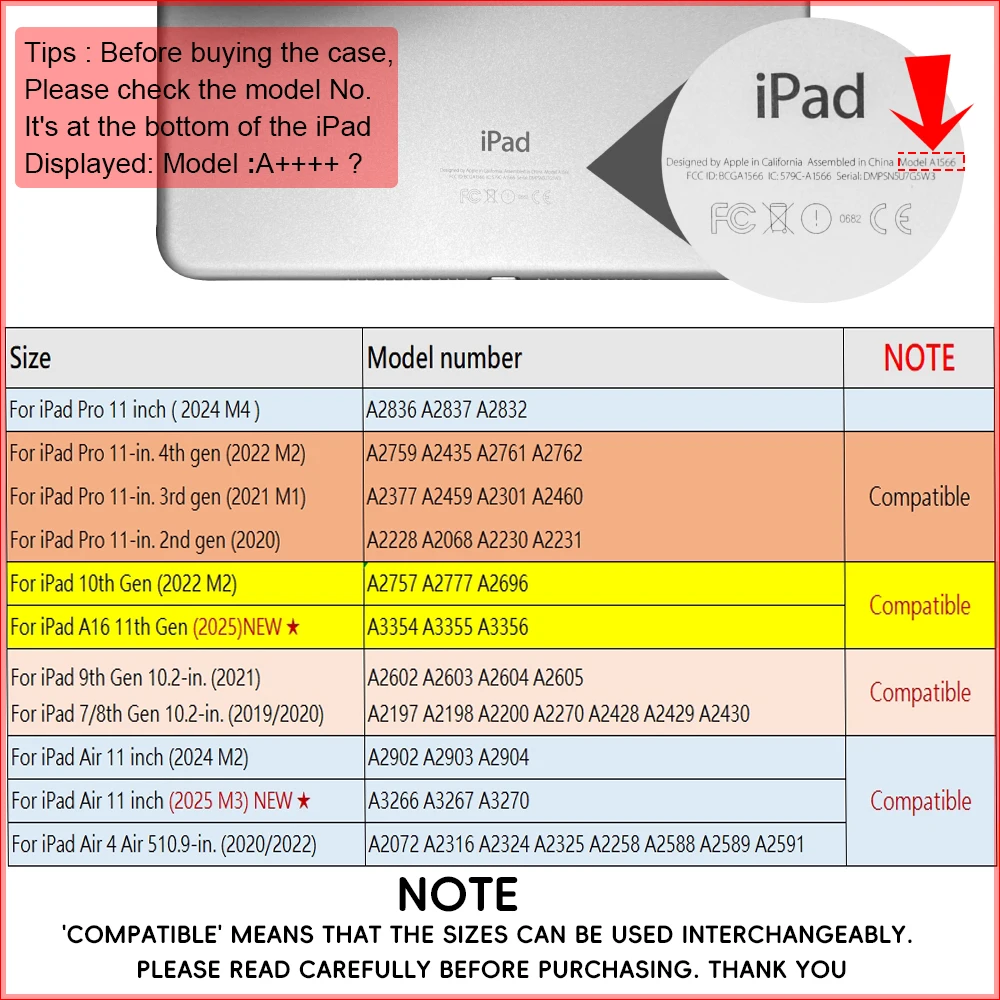
Application Laptop Size: 10.2
Battery Included: Yes
Brand Name: EGYAL
Choice: yes
Compatible Brand: For Apple iPad
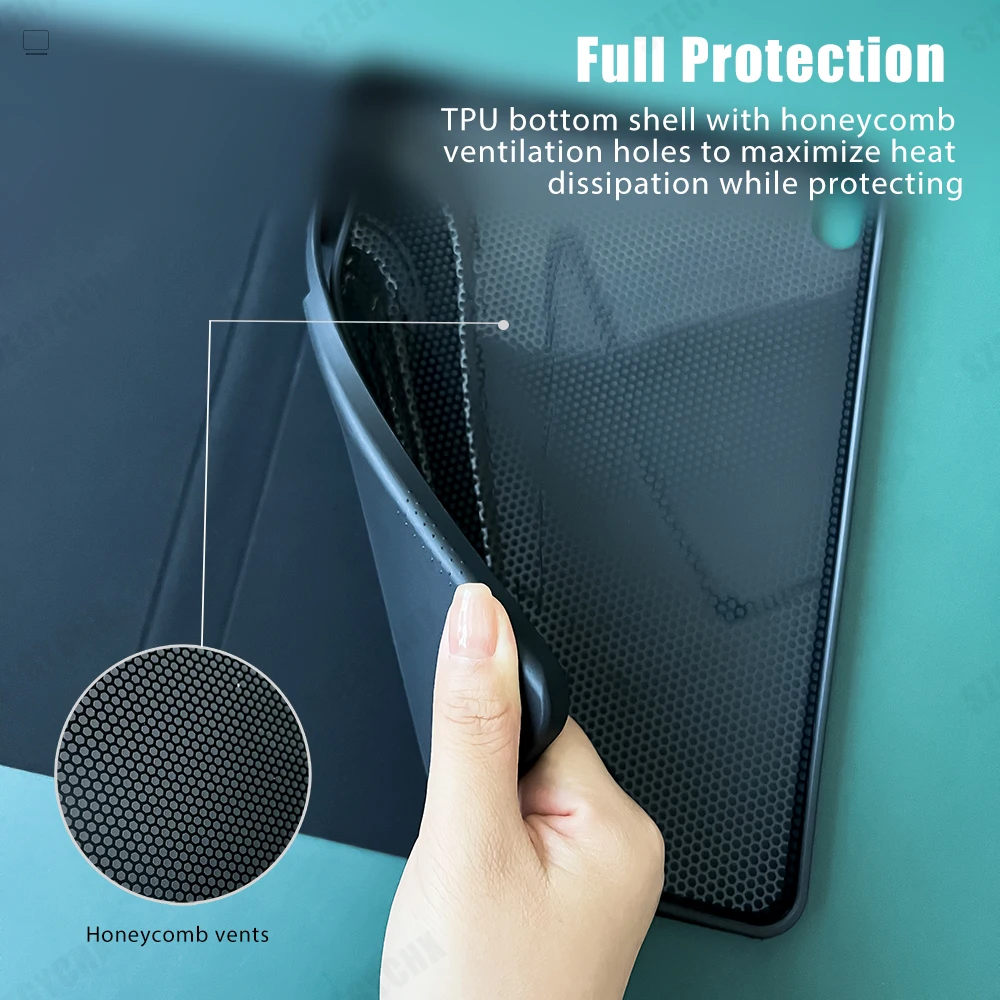
Feature: Waterproof,Shockproof,Drop resistance,Anti-Dust,Soft
For iPad 2021 Case: For iPad 2020 Case
For iPad 8th Generation Case: For iPad 10.2 Case
For iPad 9th Generation Case: For iPad 8th Generation Case
For ipad Air 5 case: A2258
For ipad case: for ipad air 4 case
For ipad pro 11 case 2021: magic keyboard
High-concerned chemical: none
Material: PU
Model Number: for ipad 7th 8th 9th gen case
Origin: Mainland China
Package: Yes
Pattern Type: Solid
Rechargeablebatteryincluded: Yes
Style: fashion
Type: With Keyboard
ipad bluetooth keyboard: keyboard with mouse
Steps to connect keyboard Bluetooth
Please turn off the iPad`s Bluetooth first,
and then turn on the iPad`s Bluetooth.
After powering on keyboard,
Simultaneously press two buttons (Fn+C) to activate Bluetooth.
The Bluetooth keyboard name will appear on the tablet,
The first connection may be slow. Please try a few more times. thanks
4 steps to open a new era of office
. The power light is on
. The bluetooth light is on
. Turn on iPad Bluetooth
. Connect Bluetooth
DUAL MODE BLUETOOTH MOUSE
(BT 4.0 + 2.4GHz): dual mode wireless mouse realizes free switches between two devices with one mouse only by only one click. 【Please turn on the "Assistive Touch" on iPad: Setting-Accessibility- Assistive Touch for an iPad usage.】
How to connect Bluetooth
Step 1: Turn on bluetooth
Step 2: Hold down the three keys "Ctrl + FN + C" at the same time, the connection is successful.
Keyboard introduction
Connection method: Bluetooth
Connection distance: 8m-10m
Compatible system: IOS/Android/Microsoft
Suitable for: smart phone/tablet/laptop (need to have Bluetooth function)
Smart sleep: no use, sleep after 30 minutes
Continuous use time: 100 hours
Standby time: 100 days
Charging time: 3-4 hours
Mouse introduction
Connection method: Bluetooth/2.4GHz Wireless USB
Connection distance: 8m-10m
Mouse DPI: 800/1200/1600
Compatible system: IOS/Android/Microsoft
Suitable for: smartphone/tablet/laptop/computer
Smart sleep: no use, sleep after 3 minutes
Continuous use time: 100 hours
Standby time: 100 days
Charging time: 2-3 hours
Multi-function Shortcut Keys Let you operate iPad more conveniently
Basic key combination
Switch apple system: FN+E
Chinese and English input method switching: FN+Space
Show physical keyboard: FN+Control
Switch software: Conmmand+Tab
Case switching: Capslock (If the iPad cannot be set first: Set one + general + keyboard + physical keyboard + turn off the caps lock key to switch the Latin keyboard)
Note: If you need to use various countries (Korean, Japanese,etc.), please set the system to add a keyboard (IPAD Settings-General-Keyboard-Add Keyboard)



Shipping Policy
At Mysa World, we are committed to delivering your orders quickly, safely, and efficiently across the United Kingdom.
Order Processing Time
All orders are processed within 3–5 business days from the date of purchase.
- Orders are processed Monday to Friday (excluding public holidays).
- Orders placed on weekends or holidays begin processing the next business day.
- Processing times may be extended during peak seasons, promotions, or sales events.
Once dispatched, you'll receive a shipping confirmation email with tracking details (where applicable).
Shipping & Delivery Time
Estimated UK delivery: 5–10 business days after dispatch.
Delivery times may vary due to:
- Courier delays
- Weather conditions
- High shipping volumes
- Remote delivery locations
Shipping Coverage
We currently ship throughout the United Kingdom, including:
- England
- Scotland
- Wales
- Northern Ireland
International shipping is not currently available unless stated otherwise on specific product listings.
Shipping Charges
Shipping charges (where applicable) are calculated at checkout based on:
- Delivery location
- Product size and weight
- Promotional free shipping offers
We may occasionally offer free shipping promotions, which will be clearly advertised on our website.
Order Tracking
Once shipped, you'll receive:
- Courier details
- Tracking number
- Shipment tracking link
Please allow 24–48 hours for tracking updates to appear.
Delivery Delays
Delays may occur due to circumstances beyond our control, including:
- Courier disruptions
- Security or customs checks
- Severe weather conditions
- Incorrect customer delivery details
While Mysa World is not liable for courier-related delays, we will assist in tracking and resolving shipment issues whenever possible.
Incorrect Address Information
Customers are responsible for providing accurate shipping details.
- Deliveries may be delayed or returned if incorrect information is supplied.
- Additional shipping fees may apply for re-dispatch.
- Address changes cannot be guaranteed after dispatch.
Lost or Damaged Shipments
If your order is lost or arrives damaged:
- Contact us within 48 hours of delivery.
- Provide your order number and supporting photos.
- Our team will investigate with the courier.
Depending on the outcome, we may provide:
- Replacement shipment
- Store credit
- Refund
Contact Us
Mysa World
Email: support@mysaworld.co.uk
Website: www.mysaworld.co.uk


